Inspector Gadget STL – Free 3D Printable Cartoon Detective
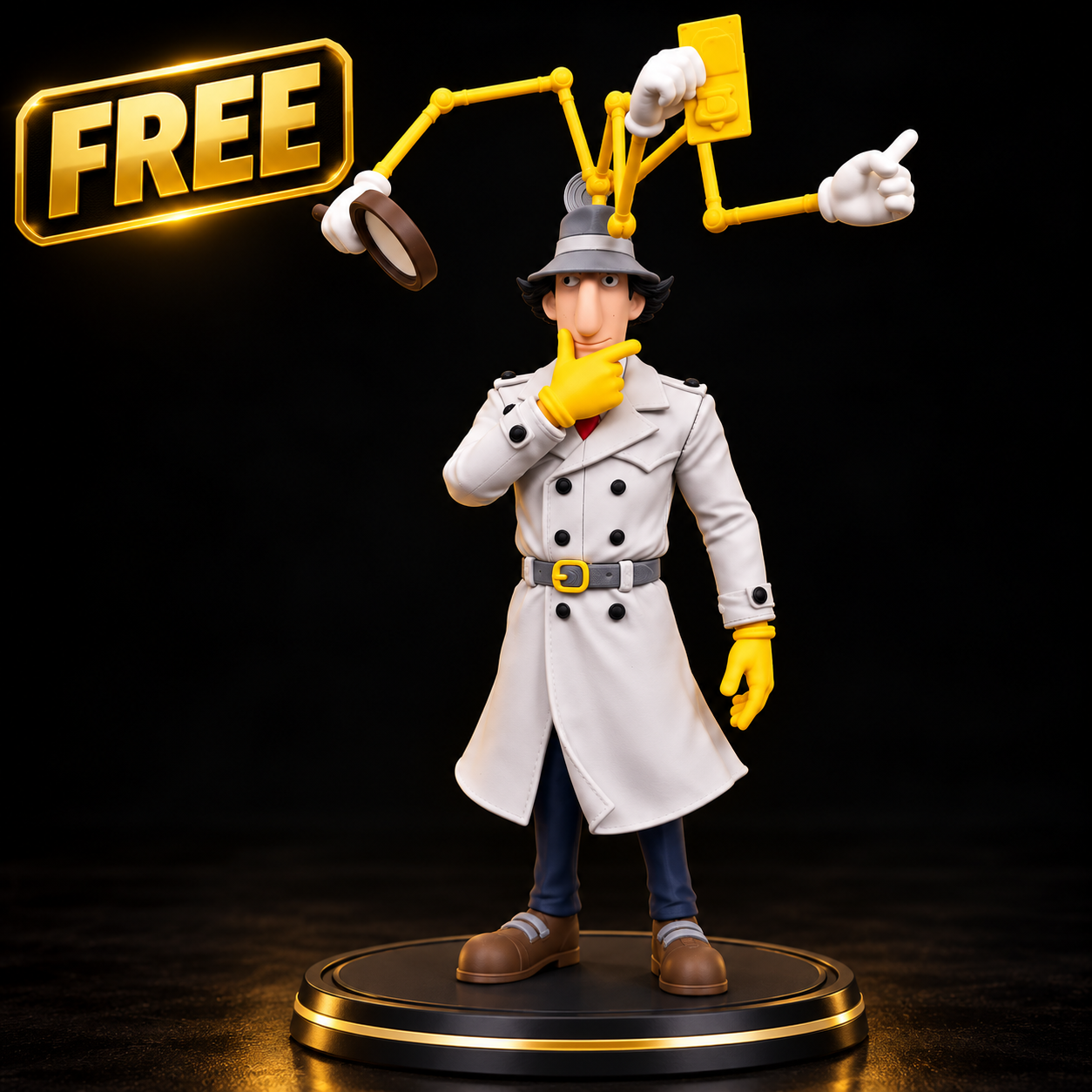
Looking for an Inspector Gadget STL file for your next 3D printing project? Discover this detailed cartoon detective figurine featuring the iconic Inspector Gadget character with his famous trench coat, detective hat, and mechanical gadgets.
This 3D printable figurine captures the humorous appearance of the classic animated detective, making it an interesting project for cartoon collectors and 3D printing enthusiasts.
The model features a recognizable detective outfit, mechanical arms extending above the character’s head, oversized shoes, and several distinctive accessories.
Whether you enjoy cartoon character figures, collectible miniatures, or creative 3D printing projects, this Inspector Gadget-inspired design offers an entertaining addition to your collection.
Inspector Gadget STL Model Features
The Inspector Gadget STL model showcases a classic cartoon detective design with detailed clothing, expressive facial features, and futuristic mechanical accessories.
The character wears a light-colored trench coat, matching detective hat, yellow gloves, and dark trousers.
One of the most distinctive elements is the collection of mechanical arms extending from the character’s hat.
These mechanical attachments create an unusual silhouette and give the figure its recognizable cartoon appearance.
Main Design Features:
- Detailed cartoon detective figurine
- Classic trench coat and detective hat
- Multiple mechanical gadget arms
- Magnifying glass accessory
- Expressive cartoon facial features
- Detailed clothing and accessories
- Recognizable detective character design
- Interesting miniature painting opportunities
- Suitable for decorative display
- Creative 3D printing project
Why Choose This Inspector Gadget STL?
Cartoon character models are popular among 3D printing enthusiasts because they combine recognizable designs with creative printing challenges.
This Inspector Gadget figurine offers a combination of detailed clothing, mechanical accessories, and exaggerated cartoon proportions.
The detective’s thoughtful expression adds personality to the design.
The extended mechanical arms create additional visual interest and make the finished model stand out from traditional character figurines.
Collectors interested in animated television characters may appreciate the figure’s classic cartoon appearance.
The model also provides opportunities to experiment with different printing materials, painting techniques, and display arrangements.
3D Printing the Inspector Gadget Figurine
Before starting your project, import the Inspector Gadget STL file into compatible 3D slicing software.
Inspect the model geometry and determine the best orientation for your printer.
Pay particular attention to the mechanical arms, accessories, and smaller details.
Depending on the actual model geometry, some areas may require additional printing supports.
Different 3D printers and materials may require different configurations.
For detailed figurines, resin printing can offer excellent reproduction of small sculpted details.
FDM printing may also be suitable depending on the model dimensions, geometry, and printer capabilities.
Always inspect the supplied files before printing.
Recommended 3D Printing Tips
FDM 3D Printing:
- Choose a suitable layer height.
- Review the model orientation.
- Configure supports where necessary.
- Check small mechanical details.
- Use appropriate printing temperatures.
- Inspect the slicing preview.
- Verify the printer’s build volume.
Resin 3D Printing:
- Select suitable exposure settings.
- Orient the model carefully.
- Support delicate features where necessary.
- Follow the manufacturer’s recommendations.
- Clean the finished model correctly.
- Cure the print according to material instructions.
These recommendations are general guidelines. The actual settings depend on the STL files, printer, and materials.
Painting Your Inspector Gadget 3D Print
Painting your completed figurine can help emphasize the character’s distinctive appearance.
Begin by cleaning and preparing the printed surface.
Apply a suitable primer before adding your chosen colors.
For a cartoon-inspired appearance, consider using light gray for the detective’s trench coat and hat.
Yellow can be used for the gloves and mechanical gadget components.
Dark blue or black can create contrast on the trousers and smaller details.
Brown can be used for the shoes.
You can also apply subtle shading to the coat, hat, and mechanical components to emphasize their sculpted features.
Painting the face carefully can help capture the character’s humorous expression.
A finished and painted figurine can become an interesting addition to a decorative cartoon collection.
Creative Uses for This Cartoon Detective STL
Cartoon Figurine Collection
Add the finished model to a personal collection of cartoon-inspired figures and decorative miniatures.
Desktop Decoration
Display the printed detective on a desk or shelf.
Miniature Painting Project
Practice painting clothing, mechanical accessories, facial features, and small details.
3D Printing Showcase
Use the model to demonstrate your printing and finishing techniques.
Creative Photography
Photograph the finished figurine using interesting lighting and decorative backgrounds.
Personal Hobby Project
Enjoy preparing, printing, and finishing a detailed character sculpture.
Any reproduction, distribution, or commercial use must comply with the original creator’s license and applicable intellectual property rights.
How to Download the Inspector Gadget STL File
Interested in printing this cartoon detective figurine?
Follow these steps:
- Find the download button on this YellowSTL product page.
- Click the button to visit the external model source.
- Review the available STL files.
- Check the original creator’s license and usage conditions.
- Download the model if it is available under the stated terms.
- Import the STL files into compatible slicing software.
- Configure your printing settings.
- Prepare your 3D printer and start your project.
YellowSTL helps users discover creative 3D printing models from external sources.
Download availability, licensing, and usage conditions depend on the original provider.
Frequently Asked Questions
What is an Inspector Gadget STL file?
An Inspector Gadget STL file is a digital 3D model representing the cartoon detective character. Compatible files can be prepared for 3D printing using slicing software.
Can I print this model using an FDM printer?
FDM printing may be possible depending on the model’s geometry, dimensions, and required supports.
Is resin printing recommended?
Resin printing can be a suitable option for detailed cartoon figurines, especially when the model contains small accessories.
Does the model require supports?
Support requirements depend on the actual STL geometry and chosen printing orientation.
Are the mechanical arms movable?
The image shows several extended mechanical arms. Whether these components are articulated or static must be confirmed by checking the original model files.
Can I resize the model?
Most slicing programs support scaling STL files. However, significant resizing may affect delicate details and printability.
Can I paint the printed figurine?
Yes. A properly prepared print can be painted using suitable hobby paints and finishing materials.
Is the Inspector Gadget STL available for free?
This page is intended to feature a free download. Check the original source to confirm availability and licensing conditions.
Can I sell printed copies?
Commercial use depends on the original creator’s license and the rights associated with the character.
Discover More STL Files at YellowSTL
YellowSTL helps 3D printing enthusiasts discover creative models and interesting projects.
Explore a growing collection of miniature figures, fantasy sculptures, decorative objects, functional designs, and other printable creations.
Whether you enjoy collecting detailed cartoon figurines or experimenting with creative 3D printing projects, YellowSTL offers inspiration for your next print.
Discover more free STL files and explore new 3D printing ideas.
YellowSTL – Discover, Download & Create.